🚀 AgentExpress
Describe it. Review it. Deploy it.
Build a governed multi-agent system by having a conversation. Plain English in, a running platform on Amazon Bedrock AgentCore out.
AgentExpress is an open-source AWS sample (MIT-0), a reference pattern rather than an AWS service or supported product. Review and harden it before production use.
Build Your Multi-Agent Platform by Talking to It
Most teams know what they want their agents to do. They get stuck on how: which framework, how to wire the agents together, how to connect tools securely, where humans sign off, how to deploy it, and how to see what it costs. AgentExpress removes that blank page. You describe your process in plain English, and the AgentExpress Assistant designs the whole multi-agent workflow for you: the agents, their prompts, the tools and their code, the stages, the human review gates and the guardrails. You watch it build, refine it in conversation, and deploy it to your own AWS account.
Describe
Tell the Assistant what the process should do, in your own words. Paste a link to a process page or attach your documents for context.
Refine
It drafts the full workflow, shows it on the canvas as it builds, and lists every default it chose. Ask for changes in conversation or drag things on the canvas.
Deploy
Deploy to your AWS account with CDK or Terraform. Sign-in, policies, memory, guardrails and observability come with it.
See It in Action
Watch a multi-agent workflow go from a plain-English description to a running, governed system: the Assistant drafts it, the Builder refines and deploys it, a run pauses for human review, and every step's cost and trace is visible.
The AgentExpress Assistant
The Assistant is where AgentExpress starts. It is a chat built into the console that designs and edits your workflow while you talk to it. A single sentence is enough to start:
Settle household insurance claims: read the FNOL, check the policy wording for coverage, price the repair, and produce a settlement decision a human approves.
From that, the Assistant drafts the agents, their prompts and contracts, the tools they need (and the code for them), the stages that run in sequence or in parallel, and the review gate where a person approves the decision. If your description is thin, it asks up to three questions, each with the answer it would assume, and you can just say go.
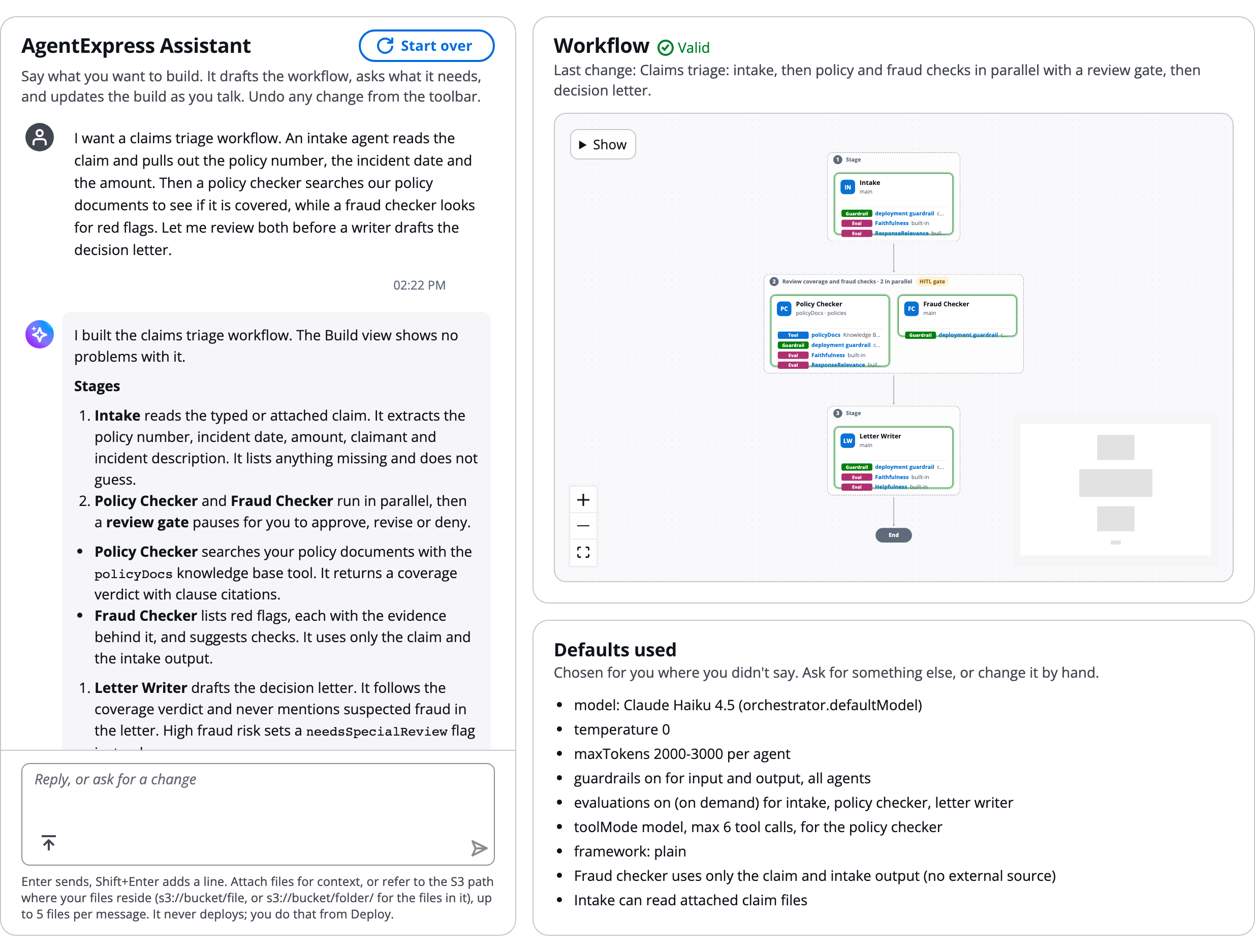
A claims-triage request on the left; the drafted workflow and every default the Assistant used on the right.
Why it makes building easy
- Start from a sentence, not a blank page: no framework to pick, no graph to wire, no infrastructure to write
- It builds everything, not just prompts: agents, steps, tools and their code, skills, interceptors, triggers, prompt caching, network settings and even hosted MCP servers
- Bring your context: say build this based on <url> and it reads the page; attach files or point it at
s3://paths in allowed buckets - See what it decided: changed agents are highlighted, Defaults used lists everything it filled in, and Needs your input lists the few values only you can give (an endpoint, an ARN, a key)
- Checked as it goes: every change is checked against the deploy's rules, and the Assistant fixes a change that breaks one before it replies
- A second opinion: with Review changes (Off, Auto or Always), a second model can check changes before they are saved
- Iterate without fear: every saved change is a named version ("go back to v1"), with undo and redo across chat and canvas edits
- You stay in control: the Assistant cannot deploy or publish; you review and deploy when you are ready
workflow.json. Nobody has to translate a requirements document into orchestration code.
What Changes for Your Team
| Without AgentExpress | With AgentExpress |
|---|---|
| Weeks choosing a framework and learning how to wire agents together | Describe the process; the Assistant drafts the workflow in minutes |
| Hand-built integrations, auth and error handling for every tool | 7 tool types, 4 built-in tools and 10 OAuth connectors, each behind the build's Gateway |
| Security and access rules added late, blocking go-live | Default-deny Cedar policy on tool calls through the build's Gateway, plus sign-in, RBAC and guardrails from day one |
| Human review bolted on with custom code | Review gates, agent questions and tool approvals declared in configuration, or added by asking the Assistant |
| Black-box agents; cost and failures discovered after the fact | Every model call, tool call and policy decision traced with tokens, latency and estimated cost |
| Weeks of Terraform or CDK before the first demo | Deploy from the console with CDK or Terraform; each build is its own stack |
| Every change needs an engineer and a redeploy | Change by conversation; update prompts and models live, with instant rollback |
Situation
The Enterprise-Wide Problem
Building production-grade multi-agent AI systems required deep expertise across orchestration frameworks, cloud infrastructure, security, observability and state management. Teams could spend weeks wiring together agents, tools, authentication, guardrails and monitoring before delivering any business value.
The Business Challenge
- High Complexity: Multi-agent systems need sequential and parallel stages, human review gates, branching and durable state across agent boundaries
- Tool Integration Burden: Knowledge bases, web search, MCP servers, REST APIs, Lambda functions, AWS APIs and SaaS systems each needed their own integration, auth and error handling
- Security & Auth Gaps: Most prototypes lacked identity management, RBAC and tool-level policy enforcement, which blocked production deployment
- No Observability: Black-box agent calls made it impossible to debug failures, track costs or optimize across agents and models
- Infrastructure Overhead: Provisioning runtimes, gateways, memory stores and guardrails required deep AWS expertise and weeks of IaC work
- Business Users Locked Out: Domain experts who understood the process could not design or change the workflow without engineers
Task
The Challenge: One Config File to a Running Multi-Agent Platform
The goal was a framework where a single declarative file drives everything (agents, topology, tools, gates, RBAC and AgentCore features), with a console that lets anyone design, deploy, run and inspect workflows without writing orchestration or infrastructure code.
- Natural Language to Workflow: An Assistant that drafts agents, prompts, tools, stages and review gates from a plain-English description and lists every default it chose
- Visual Control Plane: A Builder canvas to drag agents onto stages and tools and AgentCore features onto agents, then deploy each build to its own execution plane
- Configuration Over Code: No Terraform, CDK or Cedar edits. A mistake in
workflow.jsonfails atterraform plan/cdk synthnaming the entry, and the editor autocompletes fromworkflow.schema.json - Any Tool, Governed: Seven tool types (kb, websearch, mcp, openapi, lambda, apigateway, smithy) plus four built-in tools (Code Interpreter, Browser, document generator, AWS pricing), each tool entry a Gateway target with a Cedar permit generated from the config (tools that act as the person are authorized by their own provider)
- Agents Beyond the Orchestrator: Dedicated runtimes, no-code AgentCore Harness agents, or A2A agents you don't operate
- Human Oversight: Review gates, agent-initiated questions, tool calls that wait for approval, and re-run from any agent
- Enterprise Operations: Live config with rollback, spend limits, analytics, activity log, teams and organisation guardrails
- Dual IaC: Twin CDK and Terraform paths that create the same resources
Action
The Architecture
Browser → CloudFront (S3 UI) and API Gateway (JWT authorizer) → BFF Lambda → the orchestrator on AgentCore Runtime (LangGraph), which calls dedicated runtimes, harnesses, A2A agents and the AgentCore Gateway (Cedar-enforced tools, including hosted MCP servers). State is in AgentCore Memory and DynamoDB. The Builder deploys each build as its own stack through CodeBuild, with CDK or Terraform. The UI is React on Cloudscape.
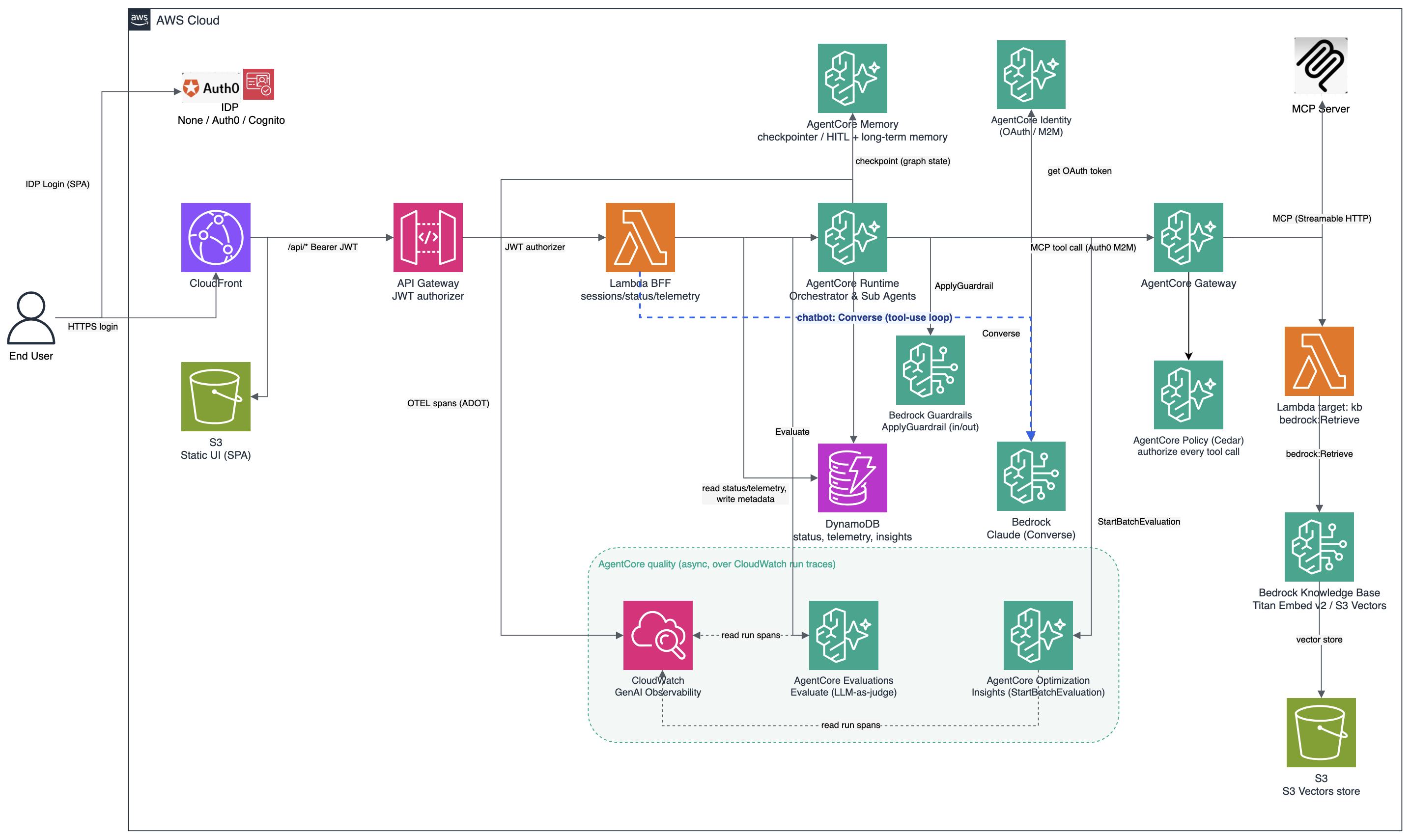
The diagram shows the core request path. Harness agents, A2A agents, hosted MCP servers, the Builder's CodeBuild deploy plane, and Auth0, Okta and Microsoft Entra ID sign-in are also supported.
Inside AgentExpress
Technology Stack
Build
- AgentExpress Assistant: A chat that drafts and edits the workflow as you talk. It reads public pages you link (build this based on <url>) and files or
s3://paths you attach, checks every change against the Builder's validation rules and fixes its own errors, and marks values only you can give (an endpoint, an ARN, a key) as "needs your input". It cannot deploy or publish - Assistant versions: Each change the Assistant saves is a named version (
v1: multi-agent draft); "go back to v1" restores one - Review changes: Off, Auto (default) or Always: a second model checks the Assistant's changes before they're saved. Auto reviews larger or security-relevant changes, Always reviews every request, and it only advises
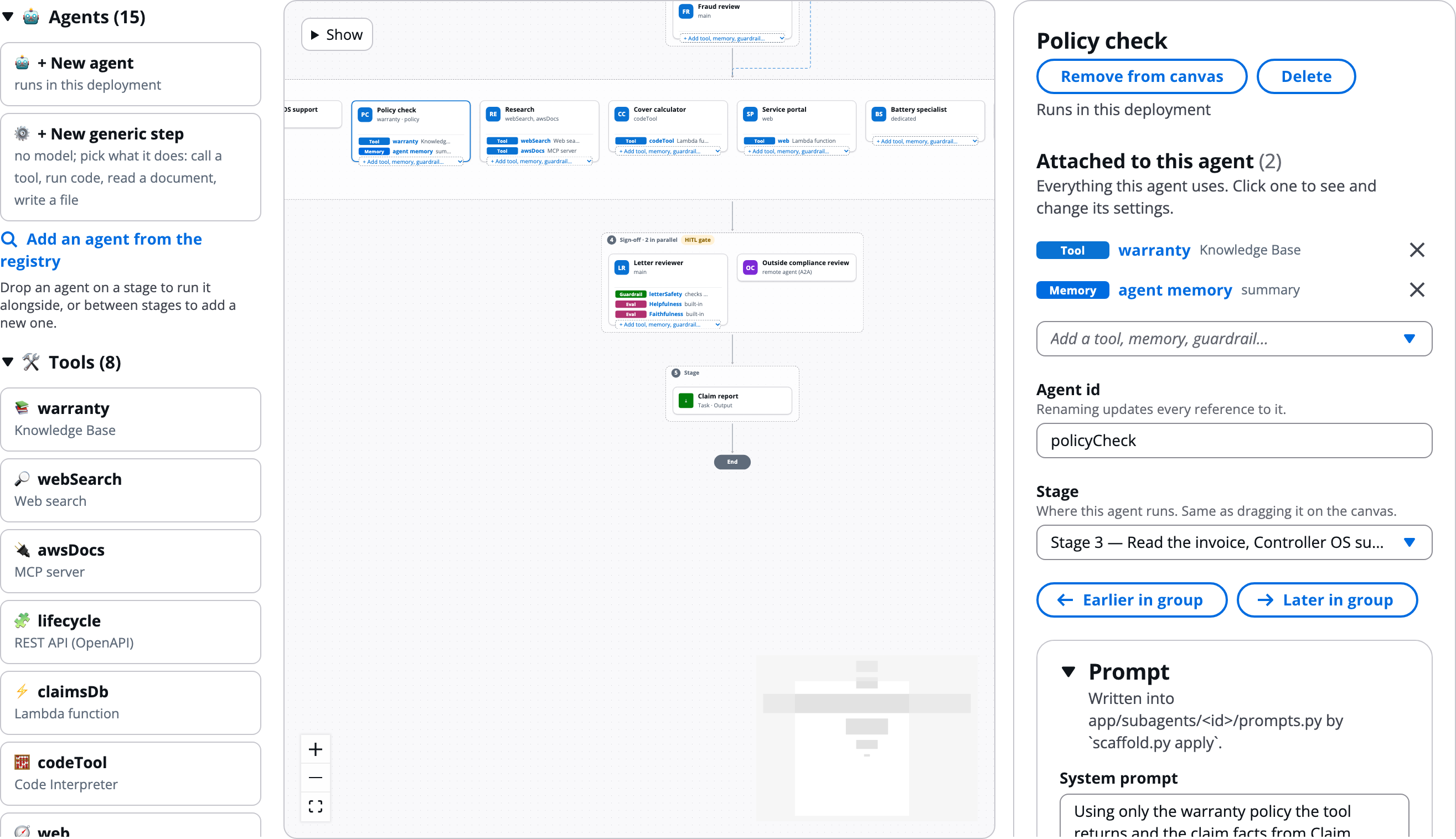
- Canvas: Drag agents onto stages, and tools and AgentCore pieces onto agents; each agent card lists its components
- Generic steps: Steps with no model (tool, code, extract, output, deliver)
- Code sources: Code for Lambda tools, interceptors, code steps and hosted MCP servers: written or uploaded in the build, from Git or S3, or a private ECR image
- Build storage:
orchestrator.storagecreates a private, encrypted, versioned S3 bucket for the build that tools name${storage}; emptied and deleted on destroy unless retained - Connectors: 10 OAuth connectors (Salesforce, Slack, Jira, Confluence, ServiceNow, GitHub, Microsoft 365, Google Workspace, Zendesk, HubSpot) as ready-made OpenAPI tools
- Library: Tools, skills, memory, guardrails, identity, policies, interceptors and evals shared across builds
- AWS Agent Registry: Add approved MCP servers, A2A agents and skills (optionally kept in sync); admins publish a build
- Teams: Team workspaces with owner, editor and viewer roles; move builds between workspaces
- Sharing, export, import: Share a build; export a bundle or
workflow.json; re-apply withscaffold.py apply <bundle> --exact - Test suites: Stored cases with fixed checks per build; pass rate by version
- Kiro skill:
agentexpress-authorturns a use-case description into a workflow
Agents and Runtimes
- main / dedicated: Run in the orchestrator, or in the agent's own AgentCore Runtime
- Task steps:
runtime: "task"calls a tool, runs a script in Code Interpreter, reads a document with Textract, writes a file, or delivers the run's files - Deliver step:
task.kind: "deliver"sends a run's files to S3, by email with Amazon SES, or to a signed webhook, with per-target file filters and conditions - AgentCore Harness:
runtime: "harness"gives an agent with no code: Gateway tools, managed Code Interpreter and Browser, a named endpoint or your own harness by ARN, other model providers (OpenAI, Gemini or LiteLLM), skills, memory, MCP servers, containers and VPC - A2A agents:
runtime: "a2a"delegates a step to an agent you do not operate (no auth, bearer, OAuth2 or SigV4) - Frameworks: Plain Python, Strands or LangGraph inside
run(); model calls go throughctx.llm - Model routing and fallbacks: Per-agent rules (
inputTokensOver,matches), up to 3 fallbacks, admin per-run override - LiteLLM:
litellm/<model>for non-Bedrock models through your proxy - Prompt caching: Per agent: cache the system prompt, tool definitions or conversation on Claude, Amazon Nova and OpenAI models, within each model's rules
- Runtime VPC: Run the orchestrator, a dedicated agent or a hosted MCP server in your VPC;
PUBLICby default - Images: Image agents (
output: "image") andvisionon later agents
Tools
Every tool entry is a Gateway target with a Cedar permit generated from workflow.json: seven tool types plus four built-in tools. Tools that act as the person are authorized by their own provider.
- kb: Bedrock Knowledge Base: S3 Vectors by default; fixed, hierarchical or semantic chunking and model parsing; your own vector store (OpenSearch Serverless or managed, Aurora, Neptune Analytics, Pinecone, MongoDB Atlas); web, Confluence, SharePoint and Salesforce sources; reranking
- websearch: AgentCore Web Search (us-east-1, eu-west-1, ap-northeast-1)
- mcp: Any remote MCP server
- Hosted MCP server: Your MCP server code, written, uploaded or linked, runs on its own AgentCore Runtime behind the Gateway
- openapi: A REST API from an OpenAPI schema
- lambda: Your function, or code written in the build
- apigateway: An API Gateway REST API stage
- smithy: An AWS service API from its Smithy model (restJson1 services; up to 20 named actions and 20 resource ARNs)
- Built-in Code Interpreter:
source: "codeInterpreter": the agent runs code it wrote in the managed sandbox - Built-in Browser:
source: "browser": open a public page and read its text and links - Built-in document generator:
source: "docgen": PDF, PPTX and DOCX files from JSON data, into a template in S3 or a built-in layout; saved with the run - Built-in AWS pricing:
source: "pricing": read-only lookups in the public AWS Price List - Acting as the person:
auth: "user"(each person connects) or"obo"(their sign-in); other tool auth modes are API key, SigV4 and OAuth2
AgentCore Features
- Runtime: The LangGraph orchestrator, dedicated agents and hosted MCP servers run on AgentCore Runtime (linux/arm64)
- Gateway: The MCP endpoint in front of the build's tools, JWT-authorized; on by default with Terraform,
-c enableGateway=truewith CDK, and every console build that has tools gets one - Cedar Policy: Default-deny on every tool call through the build's Gateway;
ENFORCEorLOG_ONLY; custom rules from plain English, a form or Cedar. Tools that act as the person are authorized by their own provider - Guardrails: Bedrock guardrails on input and/or output, build-wide or named per agent
- Memory: Checkpoints for pauses; long-term semantic, summary, user-preference, episodic or custom strategies
- Identity and sign-in: Cognito, Auth0, Okta or Entra ID; outbound OAuth2 and API-key credential providers
- Interceptors: A Lambda before each tool request to the build's Gateway (audit, block tools, argument guard, inject context) and after each answer (audit, redact email/phone/SSN/card, hide tools, cap results), or your own
- Evaluations: 10 built-in evaluators (correctness, faithfulness, helpfulness and more) plus custom LLM judges, automatic or on demand
- Insights: Shows findings from earlier AgentCore Insights jobs (AWS stopped new jobs on 16 Oct 2026)
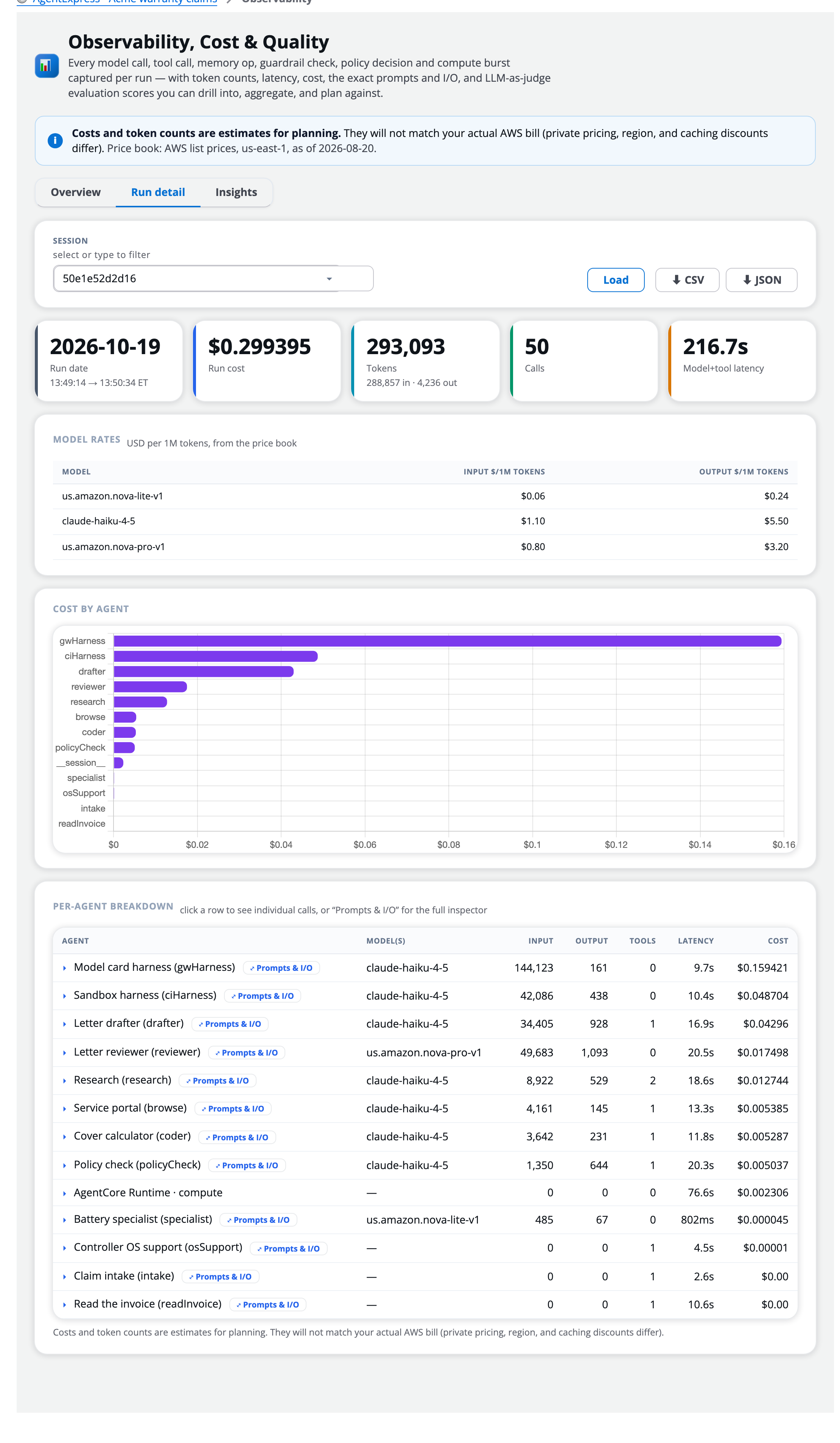
- Observability: OTEL spans with tokens, latency and estimated cost per call; Prompts & I/O inspector; prompt-cache hits, cost and savings per call and run, with per-agent caching insights; CSV/JSON export
- Observability export: Send every run to Langfuse, Datadog, Grafana Cloud, Honeycomb or any OTLP backend with a built-in connection test
- Skills: SKILL.md know-how an agent opens when needed
Runs and People
- HITL review gates: Approve, revise or deny after an agent or stage;
always/threshold/automodes, EventBridge answers, timeouts - Agent asks a person:
askPersonlets the agent ask mid-step and resume;approvalon a tool makes each call wait - Named options:
hitl.options(e.g. Override / Abort) on a gate, oraskPerson.optionsmid-step; the choice is the run fielddecisionthat branch rules route on - Branch rules: A step's output picks what runs next, skips a stage or ends the run
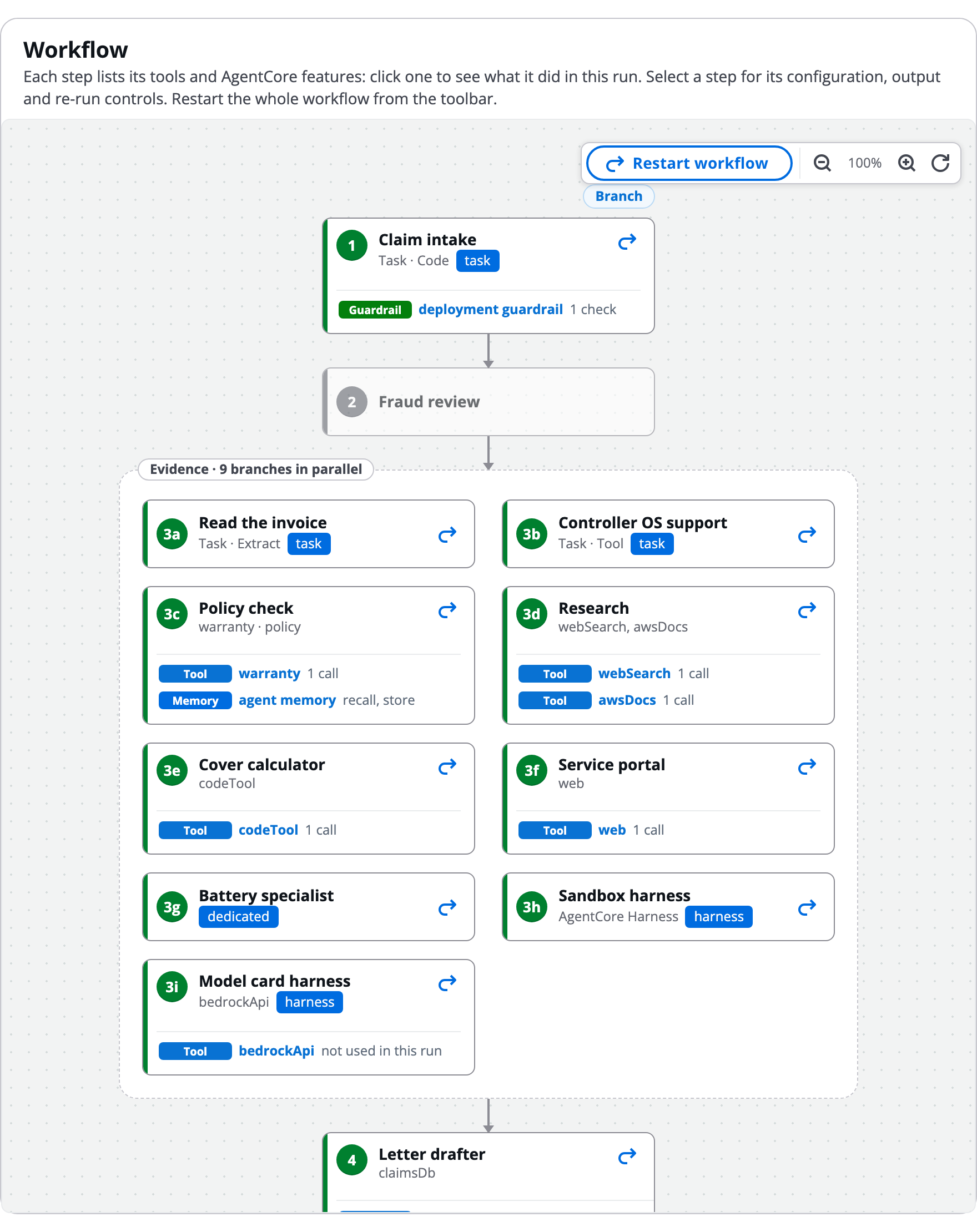
- Re-run: Re-run one agent and everything after it, with a note; each run version is kept
- Triggers: Signed webhooks, schedules, EventBridge, S3 and SQS start runs
- Attachments and files: Files a run starts with, plus files agents save and code they ran
- Run views: Graph with numbered steps; Flow tab Story and Summary with replay; Timeline Gantt chart and log
- Share links: Read-only link to one run, with expiry and revoke
- Run Assistant: In-app chat that answers about runs, cost and agents, and can approve, revise or deny gates, re-run agents and run evaluations, held to the same RBAC as the person asking
- A2A endpoint: Serve the workflow to other teams' agents over A2A (off by default)
Operate
- Live config: Versioned prompts and model settings with instant rollback, no redeploy
- Spend and run limits: Optional per-user daily spend and runs per hour, plus an app-wide monthly budget; a run stops at its next step
- Cost tag:
agentexpress:appon every resource, for Billing - Analytics: Per-tool and per-agent error, latency, denial and block rates, with health scores
- Memory records: Browse, search and delete long-term memory records
- Activity log and RBAC: Sign-ins, run actions, deploys and changes; JWT groups mapped to 12 actions (start, decision, rerun, cancel, evaluate, insights, delete, deploy, destroy, audit, admin, override)
- Organisation guardrails: A built-in SSRF guard, plus opt-in permissions boundary, role path, custom domain (TLS 1.2) and WAF
- Teardown and smoke test: One-step destroy,
teardown.shand aleftovers.shreport, ande2e_smoke.pythat runs a deployed app through every gate
Deploy
- CDK and Terraform: Twin IaC paths that create the same resources; both build the image and UI from source
- Builder deploy: Each build deploys as its own stack from the console's CodeBuild project
- Connected accounts: Deploy builds into other accounts through a role you create there
- Console modes:
app(this workflow plus the Builder) orbuilder(control plane only)
The Sample Workflow
Nine agents in four stages:
1 intake ─(HITL)─▶ 2 [ knowledge_research ‖ web_search ‖ documentation_search
     │                 ‖ cost_research ‖ lifecycle_research ]
     │                 ─(HITL)─▶ 3 [ analysis → recommendation ] ─(HITL)─▶ 4 report
     ├──(branch)──▶ 3, skipping research, if the brief has no research questions
     └──(branch)──▶ END, if the brief has no objective at all
The research agents use five tool types (KB, web search, MCP, Lambda, OpenAPI); analysis and recommendation are A2A agents. A second example, demo-everything, uses six of the seven tool types and most AgentCore features in one run.
Key Design Decisions
Configuration Over Code: You edit workflow.json, agent folders, tool code and documents. No Terraform, CDK or Cedar edits. Both IaC paths read the same source of truth.
Fail Early: Config mistakes fail at terraform plan / cdk synth naming the entry, and the JSON schema gives IDE autocomplete for every key.
Default-Deny Tools: Cedar at the Gateway means an injected prompt cannot widen tool access.
Same Rules for Assistants: The Assistant and Run Assistant act under the same RBAC as the signed-in user.
Agents You Don't Own: A2A and Harness agents plug in without shipping agent code; gates, guardrails and run tracing still apply.
Security Built In
- Sign-in (Cognito, Auth0, Okta or Entra ID) with a JWT authorizer on
/api/*; webhook triggers proven by HMAC signature - Machine tokens for agent → Gateway calls, pinned to the calling client
- Scoped IAM roles per component, optional permissions boundary and role path
- No secrets in the repo; runtimes read theirs from Secrets Manager
- Point-in-time recovery, TLS-only encrypted buckets, API logs and throttling, CloudFront security headers, immutable ECR
- Scanned with cdk-nag and checkov; each accepted finding documented
A sample, not a hardened product: work through the repo's Harden before production list first.
Result
Key Capabilities
Platform-Level Impact
- Plain English to Running Workflow: Business users describe a process; the Assistant drafts it and the Builder deploys it
- Zero Plumbing: Topology, tools, policies and AgentCore integrations come from one declarative file
- Governed by Default: Default-deny Cedar, guardrails, interceptors with PII redaction, RBAC and spend limits out of the box
- Full Transparency: Every model call, tool call, guardrail check and policy decision is traced, metered and inspectable, and exportable to existing observability tools
- Human-AI Collaboration: Review gates, agent questions, tool approvals and versioned re-runs keep people in control
- Open Ecosystem: MCP servers, A2A agents, AgentCore Harness, LiteLLM models and Strands or LangGraph agents all plug into the same pipeline
- Serverless Cost Profile: AgentCore, Lambda, on-demand DynamoDB and S3 Vectors; evaluations, guardrails, Code Interpreter and Browser sessions and Transaction Search above 1% cost extra
- Open Source: Published under MIT-0 in AWS Samples with a hands-on AWS Workshop
workflow.json, a visual Builder and a plain-English Assistant let teams design, deploy and operate governed, observable multi-agent systems on Amazon Bedrock AgentCore.
Key Learnings & Best Practices
Technical Insights
- Configuration as the API: A JSON schema with IDE autocomplete and plan/synth-time validation catches errors at edit time, not deployment time
- Per-Agent Features: Runtime, run checkpoints in Memory and tracing come with every build; the other features are optional and mostly per agent, so a build can start small and add guardrails, long-term memory or evaluations
- Dual IaC Parity: Keeping CDK and Terraform in lockstep works when both read the same config source
- Generated Policy: Deriving Cedar permits from the tool list means tool access follows the config
Platform Insights
- Assistant as the Front Door: Letting people describe a process and see the drafted workflow, with every default listed, makes multi-agent design accessible beyond engineers
- Separate Control and Execution Planes: Each build deploying as its own stack isolates teams and workloads while the Builder stays central
- Re-run Over Retry: Re-running one agent with a reviewer note, while keeping every version, lets you correct one step without repeating the whole run
- Interoperability Wins: MCP, A2A and the AWS Agent Registry let teams reuse what already exists instead of rebuilding it
Observability Insights
- Meter Everything: Capturing cost, latency and tokens on every model, tool, guardrail and policy event enables optimization that spot-checking cannot
- Meet Teams Where They Are: OTLP export to Langfuse, Datadog, Grafana and Honeycomb fits existing operations instead of adding another dashboard
- Prompt Inspection Needs Limits: Storing prompts and outputs is invaluable for debugging but needs access controls and capture limits for sensitive inputs